


EasyNotes: Notes, Memo & Lists
4.77.27K Reviews
App Specs
- Version
- 1.3.59.0819
- Updated On
- License
- Free
- Downloads
- 10,000,000+
- Developer
- Gulooloo Tech Co., Ltd.
- Categories
- Productivity
- Platform
- Android, iOS
Screenshots
 Analysis by AppCompare
I reach for a notes app when I need to capture something quickly and trust that I can find it later. Easy Notes - Note Taking Apps suits that habit better than a blank page stuffed with unrelated thoughts: it combines ordinary notes with categories and checklists, so quick reminders can stay simple while recurring parts of life get a little structure. I’d consider it for everyday organization, rather than as a full project-management system or a digital archive for complex research.
What I’d look for in a notes app
The right choice depends less on the number of features than on how you actually take notes. If you mainly want to record a shopping item, save a short idea, or jot down a reminder before you forget, speed and a clear layout matter more than elaborate formatting. If your notes are long, heavily cross-referenced, or shared across a team, then structure, collaboration, and dependable access on several platforms become more important.
Easy Notes sits in the approachable end of the productivity app category. It is made by Gulooloo Tech Co., Ltd., and the free download makes it easy to try without committing money up front. There are in-app purchases, so I’d check the purchase options in the app before deciding whether any paid extras matter to my own routine. Its Everyone age rating also makes it suitable for a broad audience, although that does not mean every note-taking workflow will fit it equally well.
Where its everyday tools earn their place
The useful distinction here is between a note you want to keep and a task you want to finish. A plain note can hold an idea or a detail, while a checklist gives a list of actions a clear endpoint. I find that separation helpful for practical things such as packing: keep the destination details in a note, then put the items to gather in a checklist. That is less cluttered than turning one long paragraph into a to-do list.
Categories can also prevent a small collection of notes from becoming a single crowded stream. I’d start with only a few labels that reflect real habits—perhaps home, work, and errands—rather than building a complicated filing system on day one. Too many categories create a new decision every time you save something. A simple setup is easier to maintain, and search can help when you remember a word but not where you filed the note.
One practical tip is to make the first words of a note distinctive. A title such as “Passport renewal” is easier to recognize in a list and easier to search for than “Important” or “Reminder.” Search is most useful when you give it something specific to find; it is not a substitute for deciding what deserves a stable place. That small habit makes a lightweight notebook more dependable without demanding a lot of upkeep.
Personal touches, with a trade-off
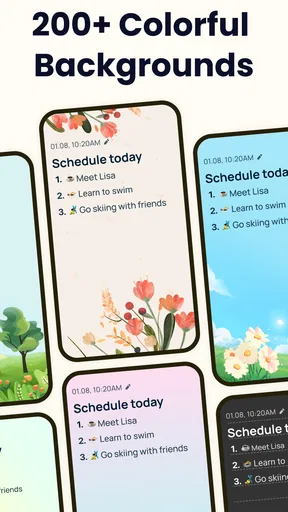
Changing backgrounds and fonts, or adding stickers, can make notes easier to tell apart and more pleasant to revisit. I’d use those options sparingly: a visual cue for a particular kind of note can help, but decorating every page can make a practical list slower to scan. The value is personal rather than essential, so anyone who prefers a plain, uniform notebook can simply keep the appearance understated.
Worth Reading Before You Choose

EA SPORTS FC Mobile 26 Is a Bigger Football Game, but It Takes Time

Flipboard Shows What News Apps Must Do Beyond the Feed

Switching to Android Auto Means Rethinking Your Driving Routine

Google Calendar Makes a Crowded Week Easier to Manage

Ludo King Makes the Most of the Minutes Between Plans

Baby Panda World Brings Quick Play to Modern Phones, but Its Game Library Feels Busy
Reminders are another feature I’d use selectively. They make sense for something that needs attention at a particular time, while a shopping list usually needs to be checked when you reach the store, not repeatedly announced beforehand. If every note becomes an alert, the reminders lose their value. A useful rule is to reserve them for time-sensitive actions and leave reference notes quiet.
When another kind of app is a better fit
Compared with a basic notes app that offers little beyond typing, Easy Notes brings more organization into the same everyday space through categories, checklists, search, and reminders. That makes it a reasonable middle ground if you want more than a digital scratchpad but do not want to manage a complicated system. The choice is less compelling if all you need is one text box for occasional thoughts; a simpler built-in notes tool may already be enough.
At the other end, people managing research, connected documents, or shared team projects may prefer a notebook designed around richer structure and collaboration. A dedicated task manager may also be a better home for projects with owners, deadlines, and many linked steps. I would not choose Easy Notes on the assumption that it replaces those specialized tools. Its appeal is keeping personal notes and modest lists approachable, not forcing every kind of work into one app.
Before switching from another notebook, I’d think about how much of my current system depends on habits that may not transfer: carefully nested folders, elaborate templates, or a particular way of linking information. Moving a handful of shopping lists and reminders is a small change; moving years of structured reference material is a different job. I’d test the app with a few low-stakes notes first and keep the old system available until I’m comfortable with the new routine.
A realistic day with it
Imagine I’m planning a busy Saturday. I can keep the address and the details I need in a regular note, make a separate checklist for groceries, and add a reminder for the one errand that has a specific time attached. When I’m in the shop, the checklist is more useful than rereading a paragraph; later, a search term can bring the saved detail back without scrolling through every note. The benefit is not that the app plans the day for me, but that each piece of information has a sensible form.
That workflow also shows where the limits appear. If the day turns into a multi-person event with lots of changing assignments, a shared planning tool is likely more suitable. If it stays a personal plan with a few notes and actions, Easy Notes keeps the overhead low. I’d avoid trying to make one note serve as a schedule, archive, and task board all at once; splitting those jobs makes the app easier to use.
Getting Started with Easy Notes
First off, downloading Easy Notes was a breeze. Available on both Android and iOS, it took me just a couple of minutes to set it up and start exploring. The first thing that struck me was how clean and intuitive the interface is. You know those apps that make you feel like you need a degree just to navigate them? This isn’t one of them. Everything is laid out in a way that just makes sense, even if you’re not particularly tech-savvy.
Features that Make Life Easier
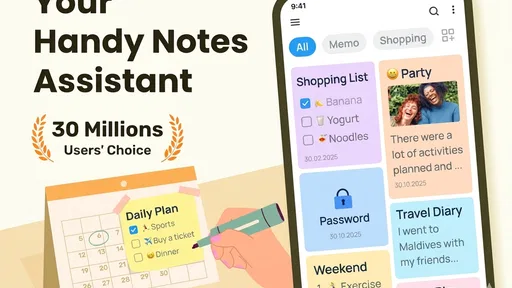
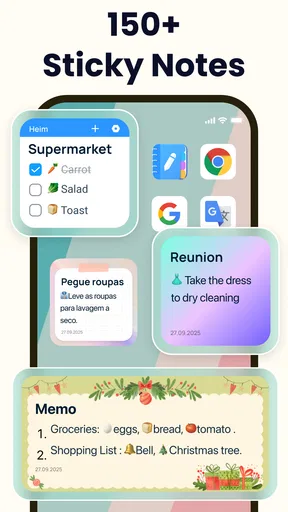
One of the standout features for me is the ability to categorize notes. I mean, who doesn’t love a bit of organization, right? You can create categories like Work, Personal, Shopping Lists, or anything else that suits your fancy. This really helps in keeping everything neatly compartmentalized.
Speaking of shopping lists, there’s a handy checklist feature that I found incredibly useful. Whether you’re making a grocery list or planning a weekend getaway, checking off items as you go is super satisfying. Plus, you can set reminders, so you never forget to grab that gallon of milk again!
Customization and Personal Touch
Another aspect I love is the customization options. You can change the background, font, and even add stickers to your notes. It’s a small touch, but it makes the whole experience a bit more personal and fun. Who knew note-taking could be this enjoyable?
And let’s not forget about the search functionality. We’ve all been there, scrolling endlessly trying to find that one note. With Easy Notes, you can find what you’re looking for with just a keyword or two. It’s like having your own little personal assistant, minus the coffee runs.
Seamless Sync and Security
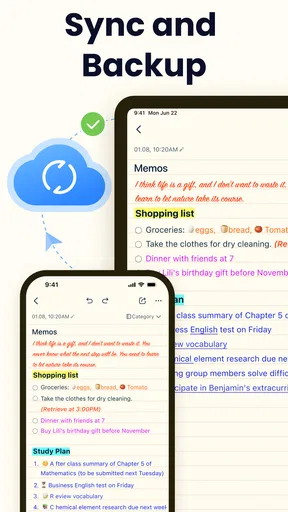
For those of us who toggle between devices, you’ll be happy to know that Easy Notes offers cloud sync. This means you can access your notes from your phone, tablet, or even your laptop. It’s all synced up and ready for you, no matter where you are.
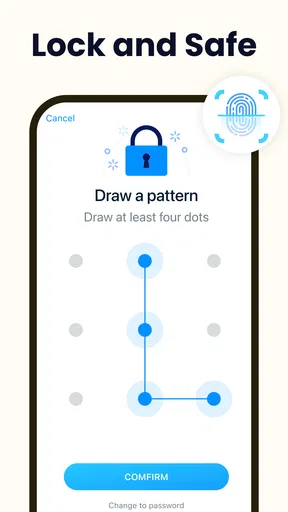
Security-wise, the app has you covered too. You can lock your notes with a passcode or even use biometric authentication. So rest assured, your secrets are safe with Easy Notes.
Usability and Performance
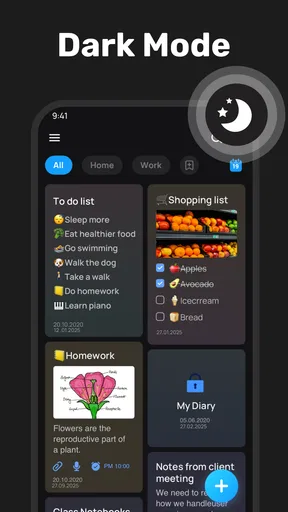
Performance-wise, I’ve encountered zero hiccups. The app runs smoothly without any lag, even when I have a ton of notes saved. It’s lightweight, so it doesn’t hog up your phone’s memory either. Plus, it’s got a night mode feature, which is a blessing for late-night thinkers like myself.
Easy Notes is a mature, widely used option, with over 10 million installs and a 4.7 average from around 397 thousand ratings. It first appeared in October 2020, and version 1.3.41.0213 is the current release. Those figures suggest that many people have found a use for it, but popularity alone cannot tell me whether it suits my habits; the best test is whether I can capture and retrieve everyday information without adding unnecessary steps.
Practical limits to keep in mind
Cloud sync is valuable when you move between devices, but I would not treat it as a replacement for a deliberate backup of anything irreplaceable. Before relying on a notes app for important records, I’d check how its sync behaves in my own setup and make sure I understand how I can keep a separate copy. A note that appears on one device is only useful if it remains accessible when I need it, so I would test the basic workflow rather than assume every change is instantly available everywhere.
The same care applies to locked notes. Passcode or biometric protection is useful when I want an extra barrier around personal content, but I would still avoid treating a phone notebook as a secure vault for highly sensitive credentials or financial records. For that job, a password manager or another purpose-built option is a better fit. The lock is a helpful privacy feature, not a reason to put every kind of secret in one place.
There is also a practical cost to personalization: a note can become visually distinctive without becoming better organized. I’d choose a small number of consistent visual cues, then rely on clear wording and categories to do the real work. If I find myself spending more time choosing a background than writing down the information, I would simplify the setup. The app is most useful when capturing a thought takes less effort than postponing it.
Who I’d recommend it to
I’d recommend Easy Notes to someone who wants a friendly place for household lists, personal reminders, short ideas, and notes that benefit from a little visual character. It is especially suitable if you are moving away from paper and want familiar actions—write, sort, search, check off—without first learning a complex system. Students could use it for brief revision prompts or errands around classes, while someone working independently might keep simple meeting takeaways separate from personal tasks.
I’d steer a team toward a shared workspace when several people need to edit the same information, and I’d point a writer with a large, interconnected research library toward a tool built for that kind of material. I would also tell anyone who dislikes maintaining categories to try a simpler notes app before migrating everything. Easy Notes is not automatically better because it has more ways to organize; those options pay off only when they match a routine you will actually keep.
Choosing without overcommitting
The app is free to download, with in-app purchases ranging from $1.49 to $79.98 per item. I’d begin with the free experience and only consider a purchase after identifying a specific need it addresses. That keeps the decision grounded in how I use the app rather than in the assumption that every paid option is necessary. The minimum operating system is Android 6.0, which is useful to check before installing on an older Android device.
For a low-risk trial, I’d add a few categories, move over only notes I use regularly, and create one checklist that I expect to revisit. Then I’d search for a saved phrase and check that the layout still feels comfortable after the novelty of customization wears off. If those everyday actions feel natural, I can transfer more gradually. If I keep reaching for my previous app because it handles a particular kind of information better, that is a useful sign to keep both or choose a more specialized alternative.
Final Thoughts
In conclusion, Easy Notes - Note Taking Apps is exactly what it claims to be—easy. It’s user-friendly, packed with features, and makes note-taking a delightful experience rather than a chore. Whether you’re a student, a professional, or just someone who likes to keep track of their thoughts, this app is definitely worth checking out.
If you’re ready to ditch the sticky notes and embrace digital organization, give Easy Notes a try. You might find, like I did, that it’s the perfect companion for your day-to-day life.
My recommendation is to treat it as an approachable personal notebook, not a universal home for every document, task, or secret. If categorized notes, checklists, reminders, and a little customization match the way you already think, it is an easy app to try and a sensible step away from loose paper. If your priority is team collaboration, complex project tracking, or a highly structured research archive, I’d choose a tool built around that need instead. The best notes app is the one I can use consistently, and Easy Notes makes that everyday habit feel pleasantly manageable.
Pros
- Intuitive interface for quick navigation.
- Customizable themes enhance user experience.
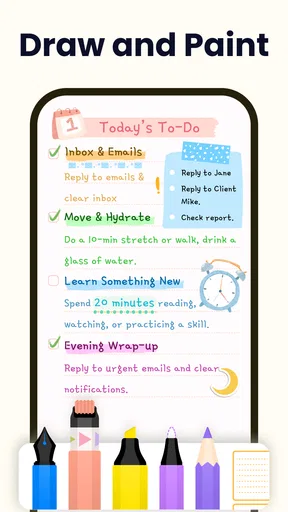
- Supports multimedia notes for versatility.
- Cloud sync ensures data is always backed up.
- Efficient search function for easy retrieval.
Cons
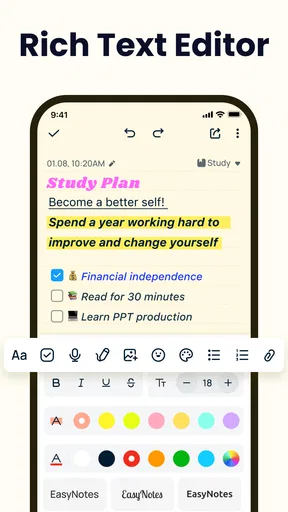
- Lacks advanced text formatting options.
- Ads can be intrusive without premium.
- Limited collaboration features.
- No offline access for free version.
- Some features locked behind paywall.
FAQs for EasyNotes: Notes, Memo & Lists
What features does Easy Notes offer?
Easy Notes provides a comprehensive suite of features designed to enhance your note-taking experience. Users can enjoy options such as customizable themes, rich text formatting, audio recordings, and cloud synchronization. The app also supports image and file attachments, making it a versatile tool for both personal and professional use.
Is Easy Notes available on both Android and iOS platforms?
Yes, Easy Notes is available for download on both Android and iOS devices. This cross-platform availability ensures that users can seamlessly access and sync their notes across different devices, providing flexibility and convenience for users who switch between operating systems.
Can I use Easy Notes offline?
Indeed, Easy Notes supports offline functionality. You can create, edit, and organize your notes without an internet connection. Once you go online, the app will automatically sync your changes across all devices, ensuring your information is always up-to-date and accessible.
Does Easy Notes include any collaboration features?
While Easy Notes is primarily designed for individual use, it does offer some basic sharing features. Users can share notes via email or messaging apps. However, real-time collaboration features such as editing by multiple users simultaneously are not supported in the current version.
Are there any in-app purchases or ads in Easy Notes?
Easy Notes is free to download and use, but it includes optional in-app purchases. These purchases unlock premium features like additional themes and enhanced storage options. The free version of the app contains ads, but users can opt for an ad-free experience by upgrading to the premium version.


